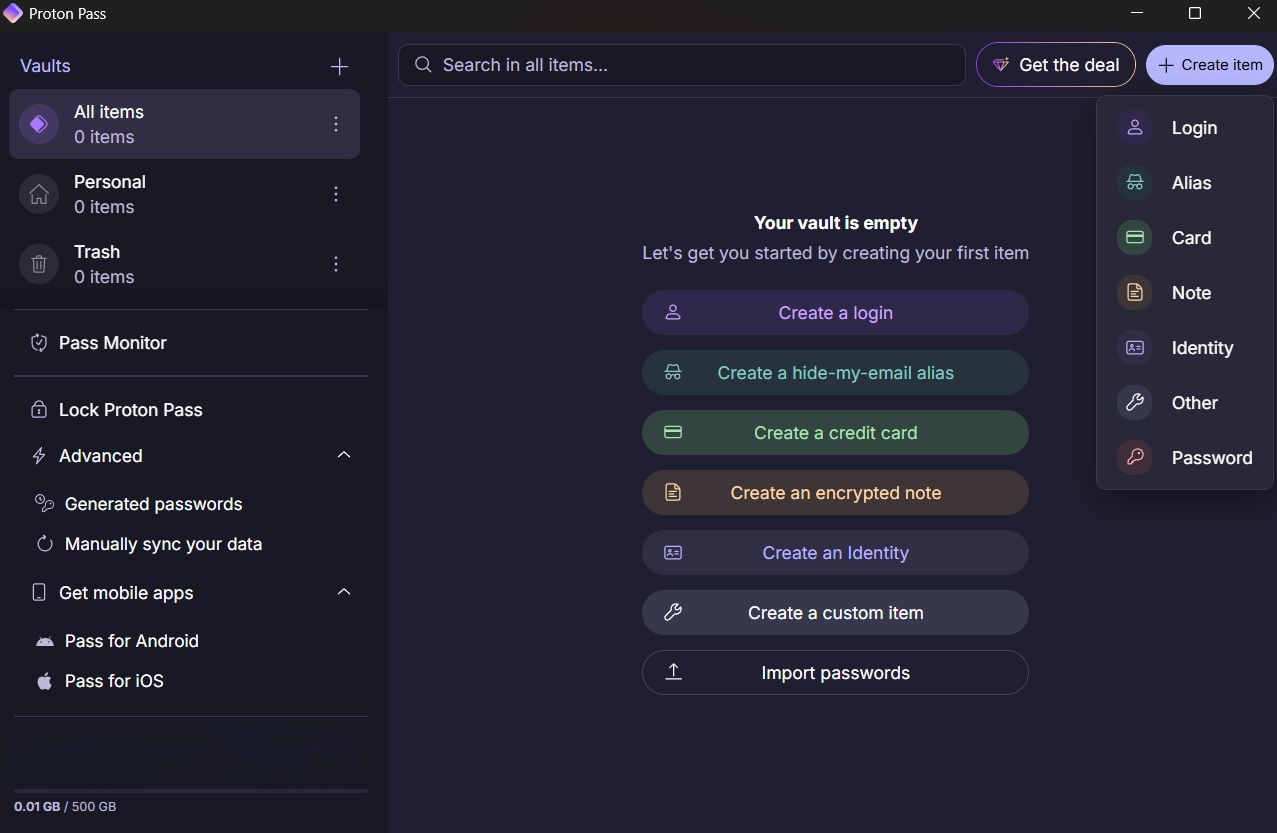
If you’re searching for a secure and free password manager, this Proton Pass review will help you decide if it’s the right choice in 2026.
Built by Proton AG, the same company behind Proton Mail and Proton VPN, Proton Pass has quickly become one of the most talked-about password managers — especially among privacy-focused users.
But with strong competition from tools like Bitwarden, LastPass, and 1Password, the big question is:
👉 Is Proton Pass actually worth using — or just another hyped security tool?
In this in-depth review, I’ll break down features, security, pricing, real-world performance, and comparisons, so you can decide if Proton Pass is the best free password manager for your needs.
What Is Proton Pass?
Proton Pass is a privacy-first password manager designed to securely store and autofill your passwords, notes, and login details across devices.
Unlike many competitors, it’s built with end-to-end encryption at its core, meaning even Proton cannot access your data.
What makes Proton Pass stand out is its integration with the broader Proton ecosystem, including:
This makes it particularly appealing for users already invested in privacy-focused tools.
At its core, Proton Pass is designed to be:
- Simple to use
- Highly secure
- Accessible with a strong free plan
Proton Pass Key Features
Password Storage & Autofill
Proton Pass allows you to securely store unlimited passwords and autofill them across websites and apps.
- Fast autofill performance
- Clean browser extension
- Easy login management
In testing, autofill works reliably across Chrome and mobile devices.
End-to-End Encryption
This is Proton’s biggest strength.
Everything stored in Proton Pass is protected with end-to-end encryption, including:
- Usernames
- Passwords
- URLs
- Notes
This is stronger than many traditional password managers.

Email Aliases (Standout Feature)
One of Proton Pass’s most powerful features is email alias generation.
This allows you to:
- Create unique email addresses for each signup
- Protect your real email from spam
- Improve online privacy
This is something many competitors either charge for or don’t offer at all.
Cross-Platform Support
Proton Pass works across:
- Chrome, Firefox, Edge, Brave
- Android & iOS
Syncing is seamless and instant across devices.
Secure Notes
You can also store:
- Private notes
- Sensitive information
- Backup codes
All encrypted the same way as passwords.
Proton Pass Pricing (Free vs Paid)
Free Plan
The free version of Proton Pass is one of the best available.
It includes:
- Unlimited logins
- Autofill
- Secure vault
- Email aliases (limited)
👉 This alone makes it a strong contender for the best free password manager.
Paid Plans (Proton Unlimited)
Paid plans unlock:
- Unlimited email aliases
- Advanced features
- Full Proton ecosystem access
Pricing is competitive, especially if you already use Proton services.
If you’re serious about protecting your data and want more than just the basics, Proton Pass Premium is a smart upgrade — especially if you already use Proton services.
👉 Upgrade to Proton Pass Premium
Is Proton Pass Safe?
Yes — Proton Pass is one of the safest password managers available in 2026.
Key security features include:
- End-to-end encryption
- Open-source code
- Swiss privacy laws protection
- Zero-access architecture
Because Proton is based in Switzerland, it benefits from some of the strongest privacy laws in the world.
👉 In simple terms: your data stays yours.
Take your privacy to the next level with Proton Pass Premium — built with end-to-end encryption and backed by Swiss privacy laws.
Proton Pass vs LastPass vs Bitwarden
Proton Pass vs LastPass
- Proton Pass: Better privacy & encryption
- LastPass: More mature ecosystem
👉 Proton wins for security-conscious users.
Proton Pass vs Bitwarden
- Proton Pass: Better UI & email aliases
- Bitwarden: More advanced features
👉 Bitwarden is stronger for power users, Proton for simplicity.
Proton Pass vs 1Password
- Proton Pass: Free option + privacy focus
- 1Password: Premium features & polish
👉 1Password wins on features, Proton on value.
Proton Pass Pros and Cons
✅ Pros
- Excellent free plan
- Strong end-to-end encryption
- Email alias feature
- Easy to use
- Privacy-focused company
❌ Cons
- Fewer advanced features than competitors
- Still relatively new
- Limited sharing features
Real-World Testing
In real-world use, Proton Pass feels fast, clean, and beginner-friendly.
Setup takes just a few minutes, and importing passwords from another manager is straightforward.
What stood out most:
- Smooth autofill
- Clean interface
- No clutter or confusion
For everyday use, it delivers exactly what most users need — without complexity.
Who Should Use Proton Pass?
Proton Pass is ideal for:
- Privacy-focused users
- Beginners
- People switching from insecure password habits
- Users already using Proton services
Who Should Avoid It?
You may want to consider alternatives if you:
- Need advanced team features
- Want deep customisation
- Require enterprise-level tools
Is Proton Pass Worth It in 2026?
👉 Yes — especially if you want a free, secure, and easy-to-use password manager.
For most users, Proton Pass offers the perfect balance of:
- Security
- Simplicity
- Value
Alternatives to Proton Pass
If you’re exploring options:
- Bitwarden (best for advanced users)
- 1Password (premium experience)
- NordPass (user-friendly alternative)
Final Verdict – Proton Pass Review
Proton Pass is one of the best free password managers available in 2026, combining strong security with a clean, user-friendly experience.
It may not yet match the depth of long-established competitors, but for everyday users — especially those who value privacy — it’s an excellent choice.
If you want a secure, simple, and genuinely free password manager, Proton Pass is absolutely worth trying.
Ready to upgrade your online security?
Unlock advanced features like unlimited email aliases, full Proton ecosystem access, and enhanced privacy with Proton Pass Premium.
👉 Get Proton Pass Premium here
Frequently Asked Questions (FAQ)
Is Proton Pass really free?
Yes — the free plan includes unlimited password storage and essential features.
Is Proton Pass better than LastPass?
For privacy and security, yes. For advanced features, LastPass still has an edge.
Can Proton Pass be hacked?
No system is 100% immune, but Proton Pass uses strong encryption, making it extremely secure.
Does Proton Pass work offline?
Yes, with limited functionality depending on your device.